Back to projects

Case 03 · 1Doc

Process document tree

How we investigated the failures of the Document Tree, the PDF export of administrative processes used for accountability reporting, and shaped its evolution through interviews, a survey with more than 24,000 responses, and a new technical solution.
  • Complex interfaces
  • Digital processes
  • Research
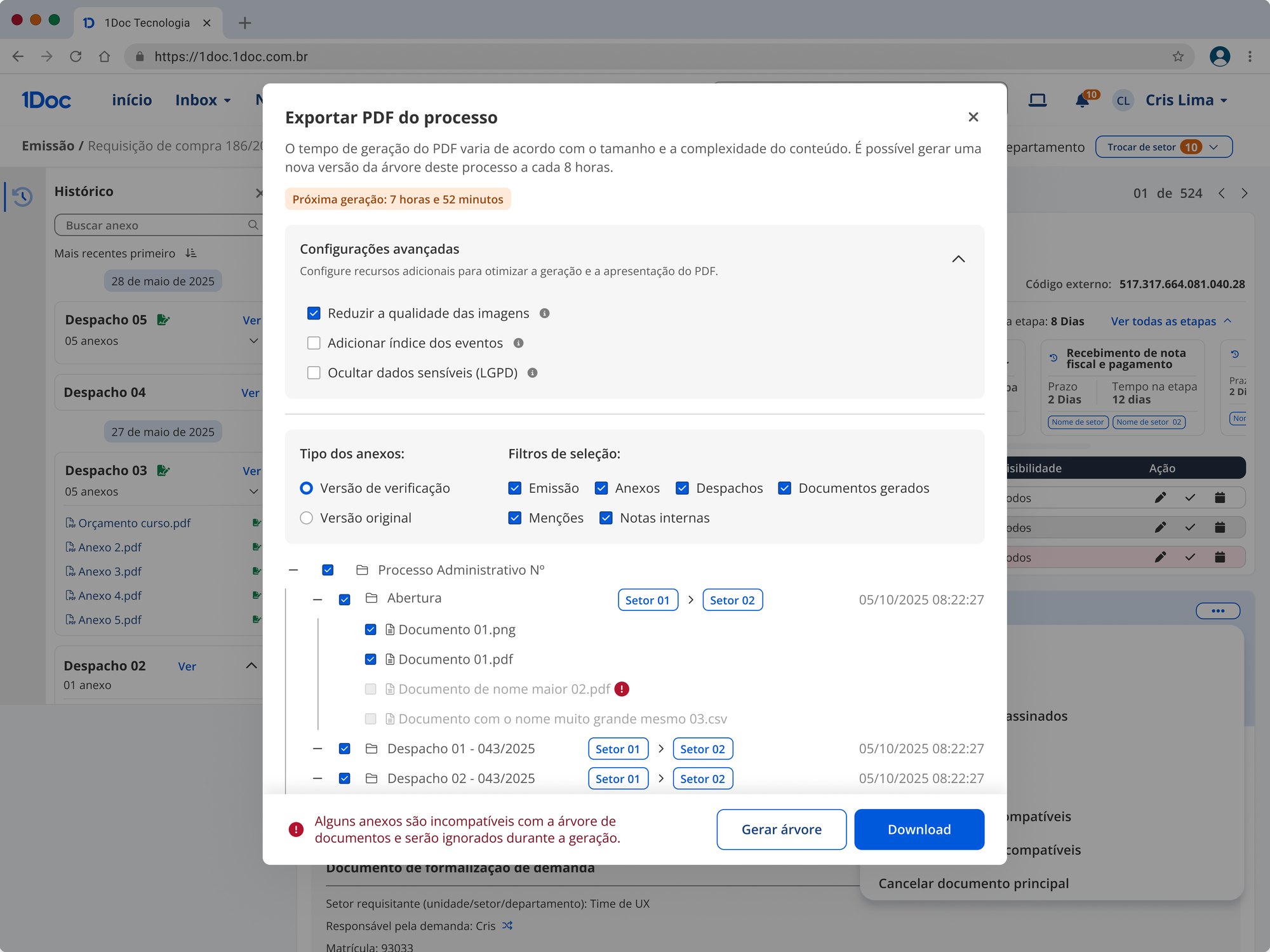
Export process PDF modal in 1Doc: advanced settings, attachment type, selection filters, and a document tree with incompatible items flagged.
Company
1Doc · Softplan
My role
Product Designer
Timeline
Q3 - 2026
Team
Raquel Rebouças (Product Designer)
Priscila Moretto (Product Manager)
Raphael Paez (Tech Lead) 
Methods
On-site visit · Interviews · On-page survey 
01

Context

The Document Tree converts and merges a native 1Doc process, along with all of its attachments, into a single compiled, paginated PDF.

It was built to meet a core municipal need: producing processes for accountability submissions to external entities, agencies, and systems, including oversight and audit bodies.

Before this project, the Document Tree already existed in two versions: the legacy one, from 1Doc's old interface, and a redesign made during the migration to the new interface.
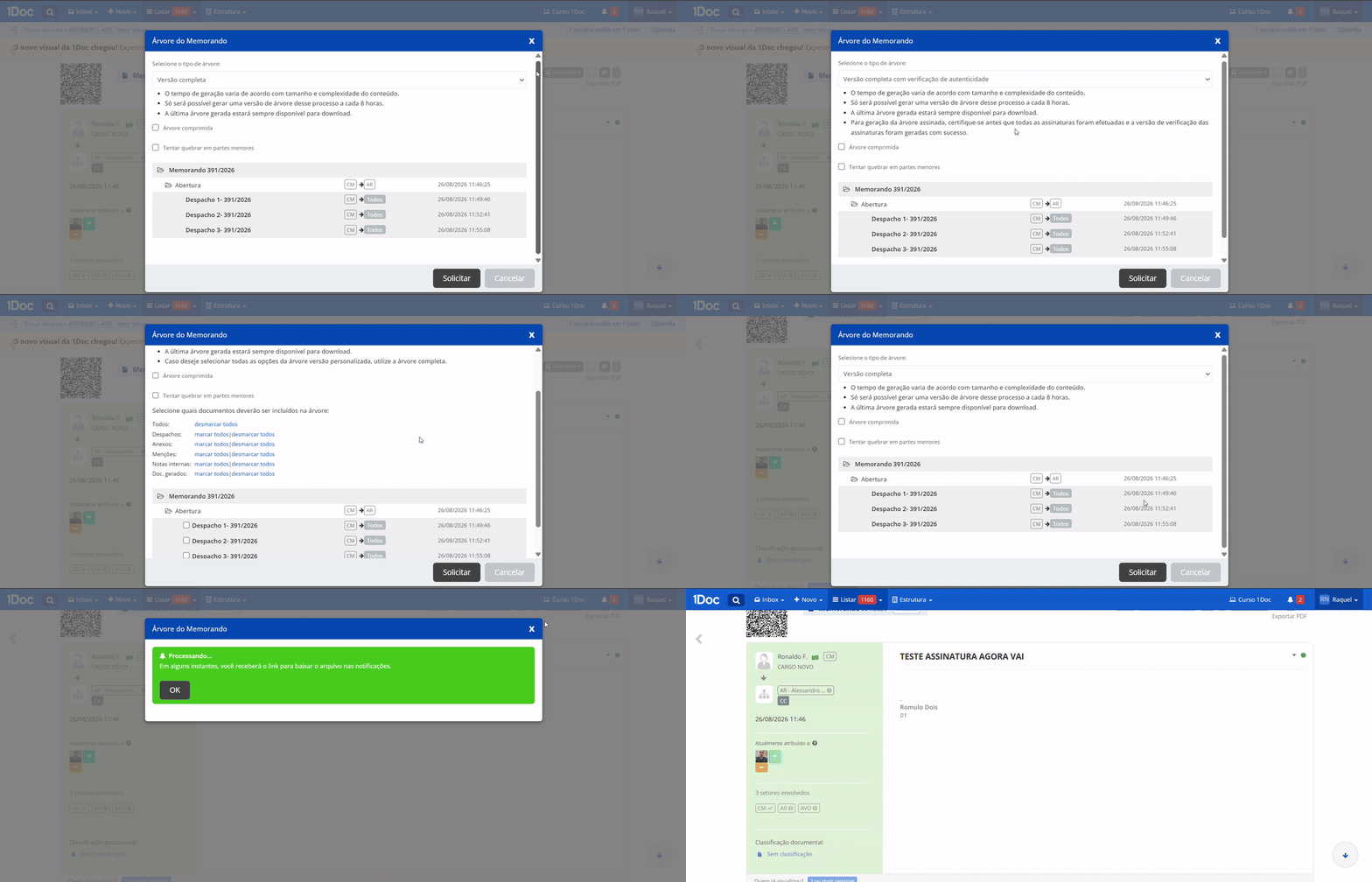
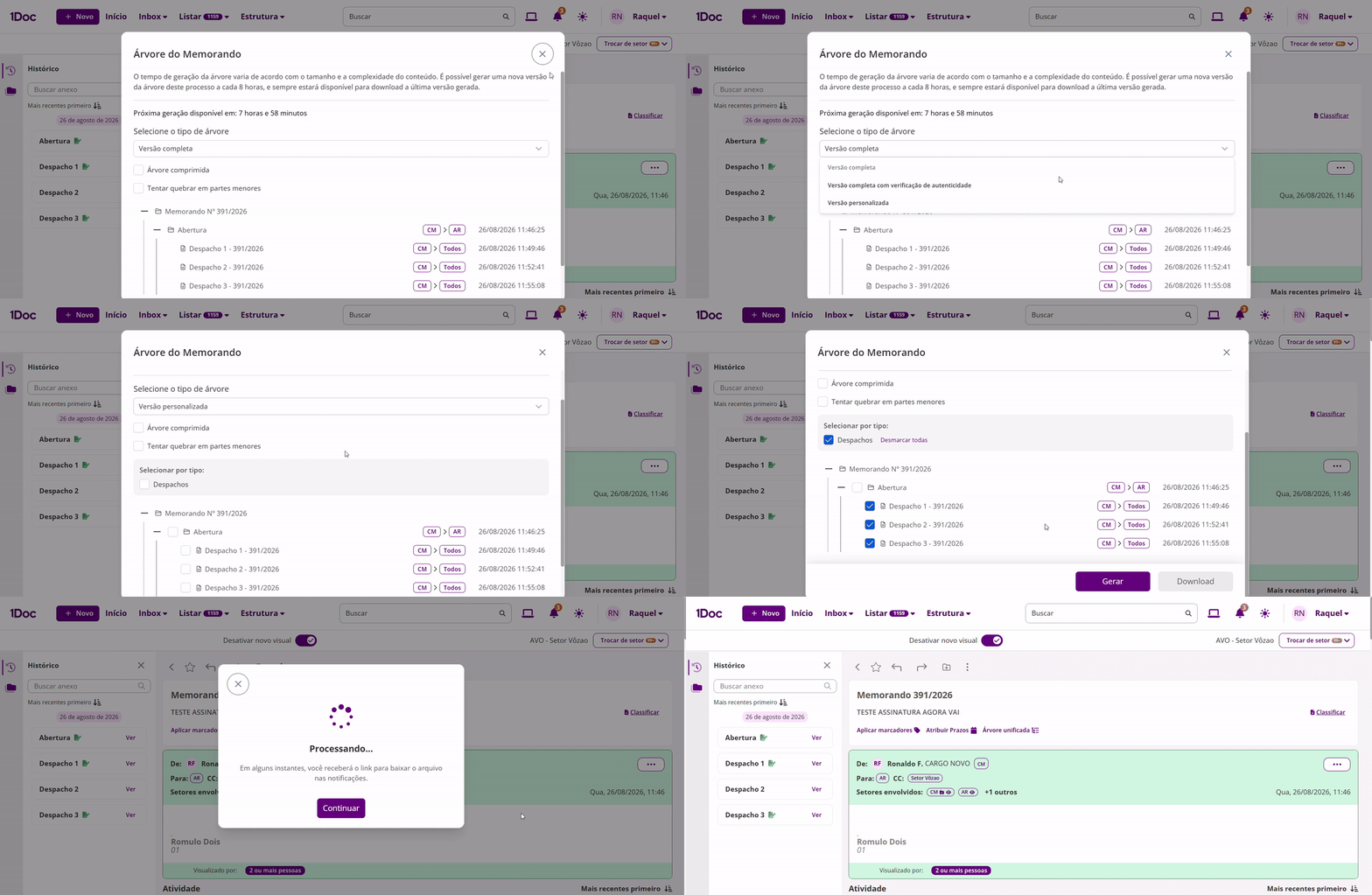
Recording of the legacy Memo Tree: the user picks the tree type among full version, full with authenticity check and custom, sees the process documents and requests generation, which returns a processing message.
Legacy version of the Memo Tree: choosing the tree type, the process documents and requesting generation.
Recording of the Tree redesign in the new 1Doc interface: the user picks the tree type, selects dispatches by type, generates the tree and downloads it.
Redesign of the Tree in the new interface, before this project: tree types, selecting documents by type, generation and download.
02

Problem

Over time, the Document Tree began failing at a significant rate. Every week, several tickets were opened for manual reprocessing, eating up the engineering team’s time and delaying the roadmap.

The problem became clear in Mata de São João (BA), the source of a string of incidents. The team’s tech lead and PM made an on-site visit to the municipality to understand what was triggering the failures. There, the Document Tree is used mainly for accountability submissions to the Bahia Municipal Audit Court (TCM-BA), and generation errors were behind a large share of the tickets.

  • TCM-BA size limits. The court only accepts pages up to 500 KB and files up to 5 MB. The generated PDFs often exceeded these limits and were rejected on upload.
  • Complex files. Attachments with many layers or heavily vector-based elements caused problems when processing the PDFs.
  • Exposed personal data. The export didn’t mask personal data, creating a risk of LGPD non-compliance whenever the document was sent to third parties.
  • Text layer. The final file needs to keep its text searchable, to support search and ensure the content stays traceable.
03

Process and discovery

Interviews with municipalities

To find out whether the same problems showed up in other municipalities, we asked the Customer Success team to point us to clients who were unhappy with the Document Tree, and we ran remote interviews with each of them.

Ananindeua (PA)

Uses the Document Tree to find a process’s page numbers and cite its content in communications with the Municipal Attorney’s Office.

Taubaté (SP)

Generates the Document Tree daily to cite pages in communications with the Municipal Attorney’s Office.

  • The attachment size limit forces users to split files before uploading them.

Pato Branco (PR)

Daily use in procurement processes and to bring transparency to administrative acts.

  • Generation errors in specific processes.
  • Need to select specific dispatches in the Document Tree while keeping their signatures.
  • The custom Document Tree, which lets users choose what goes into it, can’t include signed documents.
  • Data anonymization before publishing to the Transparency Portal.
  • Slowness with large trees; they suggested generating in batches of 50 dispatches.

Rio Verde (GO)

Occasional use, for requests from city council members, the Public Prosecutor’s Office, ITBI (property transfer tax), and health. They find the output clear and straightforward.

  • Titles and paragraphs don’t render correctly.
  • Not all of the filing information is displayed.
  • ITBI processes need to allow documents to be appended.

On-page survey

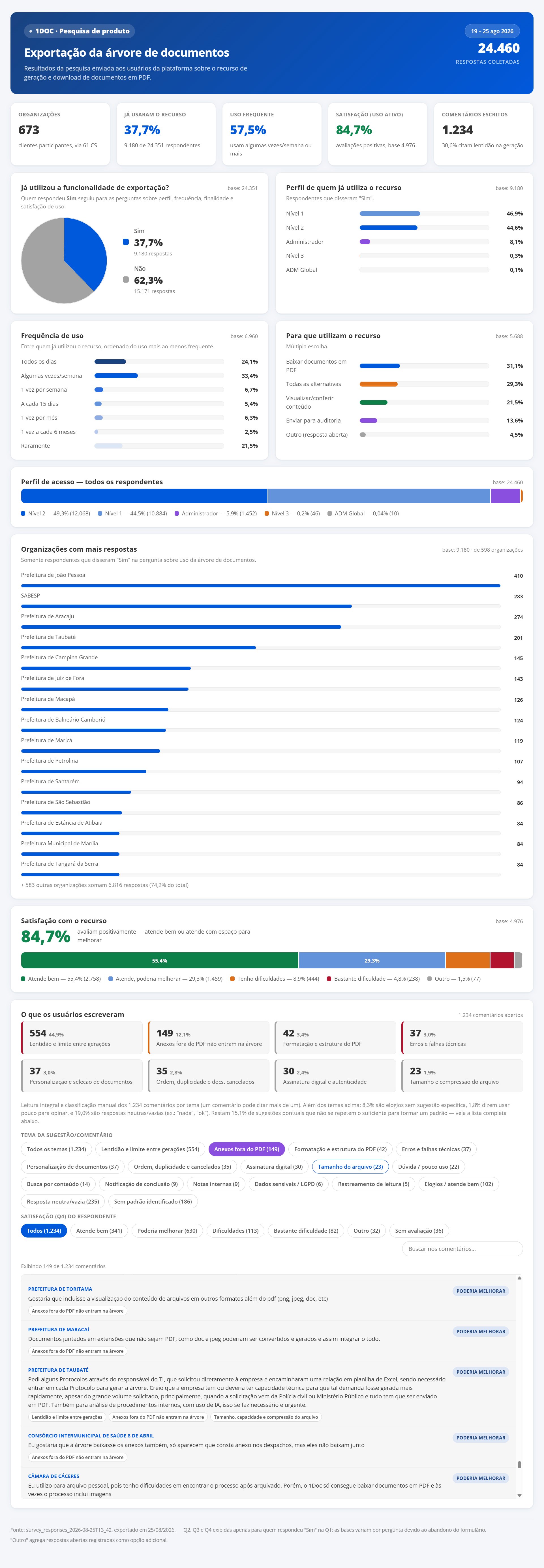
To broaden the sample, we launched a quick survey on the export screen, asking who uses the Document Tree, how often, and what for.

  • 24,460total responses
  • 5,688answered every question
  • 1,234open-ended comments

Who uses it

Level 1 users46.9%
Level 2 users44.6%

How often

Several times a week33.4%
Every day24.1%
Rarely21.5%
How often people use it depends on the municipality’s context. Some users look up and share processes every day; others only use the feature in specific situations, such as accountability reporting.

What they use it for

  • Accountability reporting
  • Downloading documents as PDF
  • Viewing, searching, and extracting information
  • Sharing with departments or citizens
  • Citing process pages
Dashboard I built from the spreadsheet export of the survey responses.

Key patterns in feedback and suggestion comments

  1. PerformanceGeneration time and limits

    Slow processing and a generation cap that doesn’t meet daily demand.

  2. FormatsNon-PDF attachments are left out

    Users say images, Word files, and ZIPs should also be included in the Document Tree, since they are part of the processes.

  3. Custom treeSelection with authenticity

    Choosing specific dispatches and attachments while keeping signature verification; today, signatures are only available in the full version.

  4. Fixed fieldsFixed fields missing from the PDF

    Bug. Text and paragraphs filled in under subjects don’t appear, making the process hard to follow.

  5. PrivacyNeed for anonymization

    Masking personal information provided in the process, in line with the LGPD.

  6. FormattingPresentation improvements

    Moving the page numbers and adding a cover page and table of contents to the files.

  7. ReferencingPage numbers

    The Document Tree is generated just to find a page number and cite it in other documents.

  8. SearchSearch like a PDF

    Users expect to use Ctrl + F to find information.

  9. LinksLinked documents

    Documents linked to the main process should also be included in full.

In users’ own words

“When taxpayers attach documents that aren’t PDFs, like images and others, they don’t show up in the tree’s attachments. This causes problems when auditing the requests. We usually use this tool to send things to the Attorney’s Office. But they could also be given access if the link to the requests were included, so the tool could be more useful to the requester themselves if they ask for a copy... even so, it would be better if there were also information about the other attachments, not just the ones in PDF format.”Santa Vitória do Palmar City Hall
“I’d like the tree to accept every document extension. Right now it only accepts PDFs. Here at the culture department we serve people with many difficulties who can’t tell the difference between a JPG and a PDF. So when they apply to a public call and we need to send the applications to external jurors hired by the City Hall (people without internal access to 1Doc), we’d like to use the document tree. But today that isn’t possible, since not every document would be sent for review.”Taubaté City Hall
“I wish there weren’t an 8-hour wait to generate a new tree, that page numbers didn’t change because of new signatures, that it didn’t split a process into several files, that it never took more than 10 minutes to generate a tree regardless of the process size, that it came compressed somehow, as a light document optimized to feed other systems (like SAJ-Procuradorias, another Softplan product, or email). I wish I could select only some dispatches but with authenticity verification, which isn’t available today, without generating new page numbers. That each file/dispatch had an absolute page position. I wish files other than "*.pdf" were also included in the tree. Or just ban the other file types altogether.”São Sebastião City Hall

Validating the digital folder

Since many clients generated the Document Tree just to find page numbers, we tested a prototype of a digital folder currently in development with them, to see whether its viewing and navigation would meet that need.
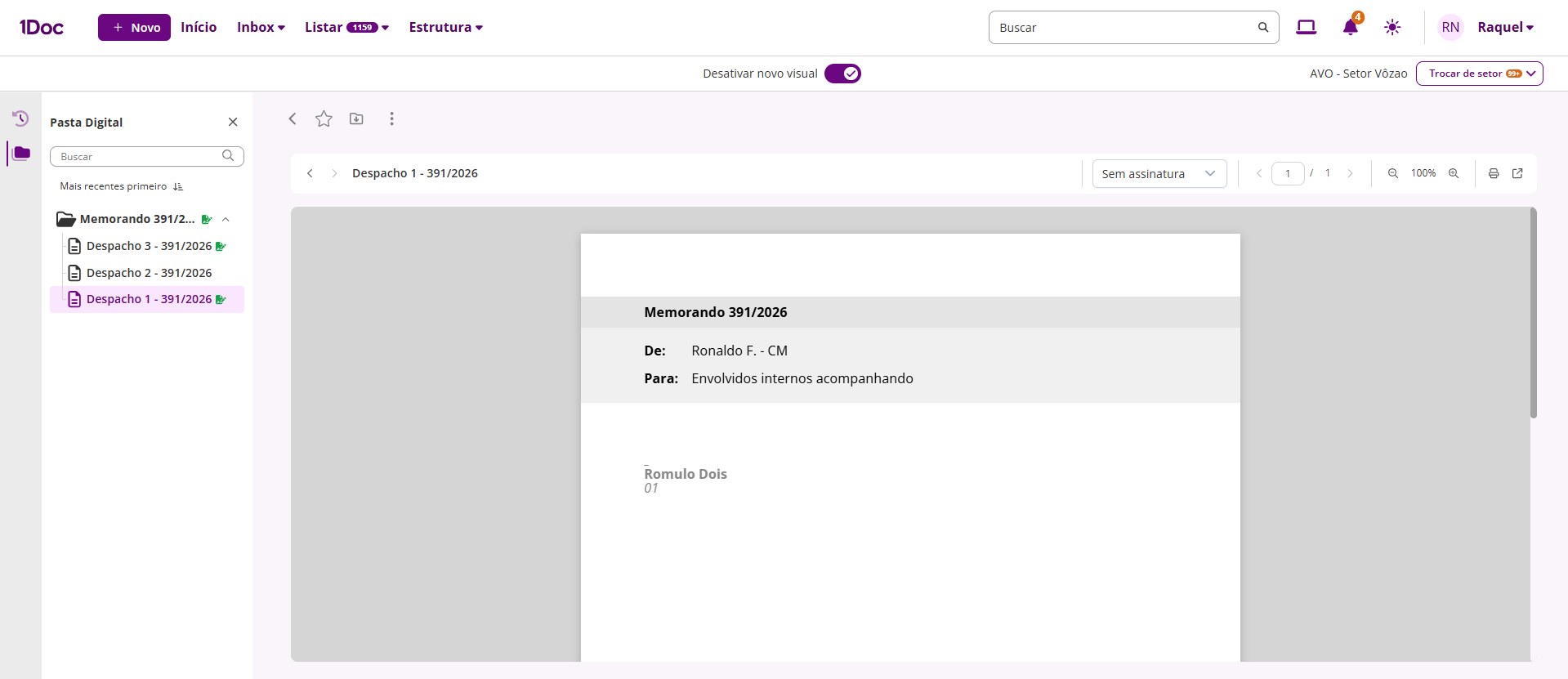
  • Works when the client only needs to cite a page number.
  • Works when the client wants to search within the document.
  • Doesn’t work for those who need other settings, such as choosing which files go into the Document Tree or including the verification version.
  • Doesn’t solve the generation problems. The process still has to be exported for the audit courts.
Digital folder prototype in 1Doc: side panel with the memo and its dispatches as a tree, next to the document viewer with pagination and zoom controls.
Digital folder prototype shown to clients: the process documents are organized as a tree, and the viewer shows the page count for each one.
04

Solution

A technical fix for the bugs

The engine that merges the PDFs, previously based solely on Ghostscript, now uses 1PDF/QPDF. If a file can’t be generated through the new path, the system falls back to the original one.

We also created an “anomaly” queue dedicated to the most vector-heavy, large files or those that fail during processing: anything the regular queue can’t handle is rerouted there. With the new code, the small, medium and large queues also started processing faster.

The solution is already live and also fixed bugs such as titles and paragraphs not showing up in the PDF.

Storing generated trees

During the project, I found that generated trees were stored on the platform forever, even after the user had already downloaded or used the file, which increased our AWS storage costs.

These files were accessed through notifications, and people rarely went back there to look for a tree generated long ago: they were more likely to generate a new one.

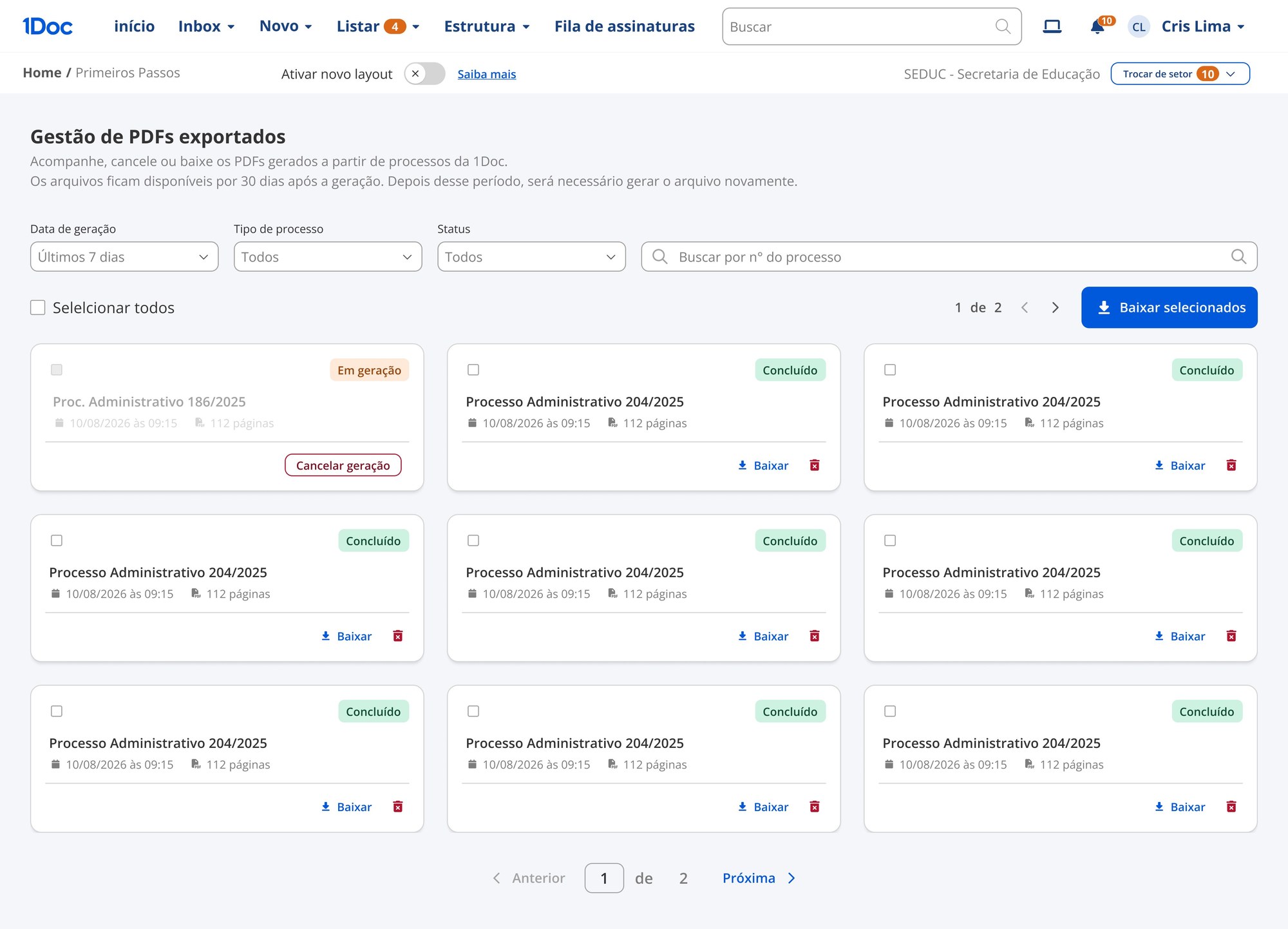
The new exported PDFs screen gives users more control and limits storage to 30 days. After that, the files are deleted.

Prioritized improvements

The improvements project is planned for Q1-2026.
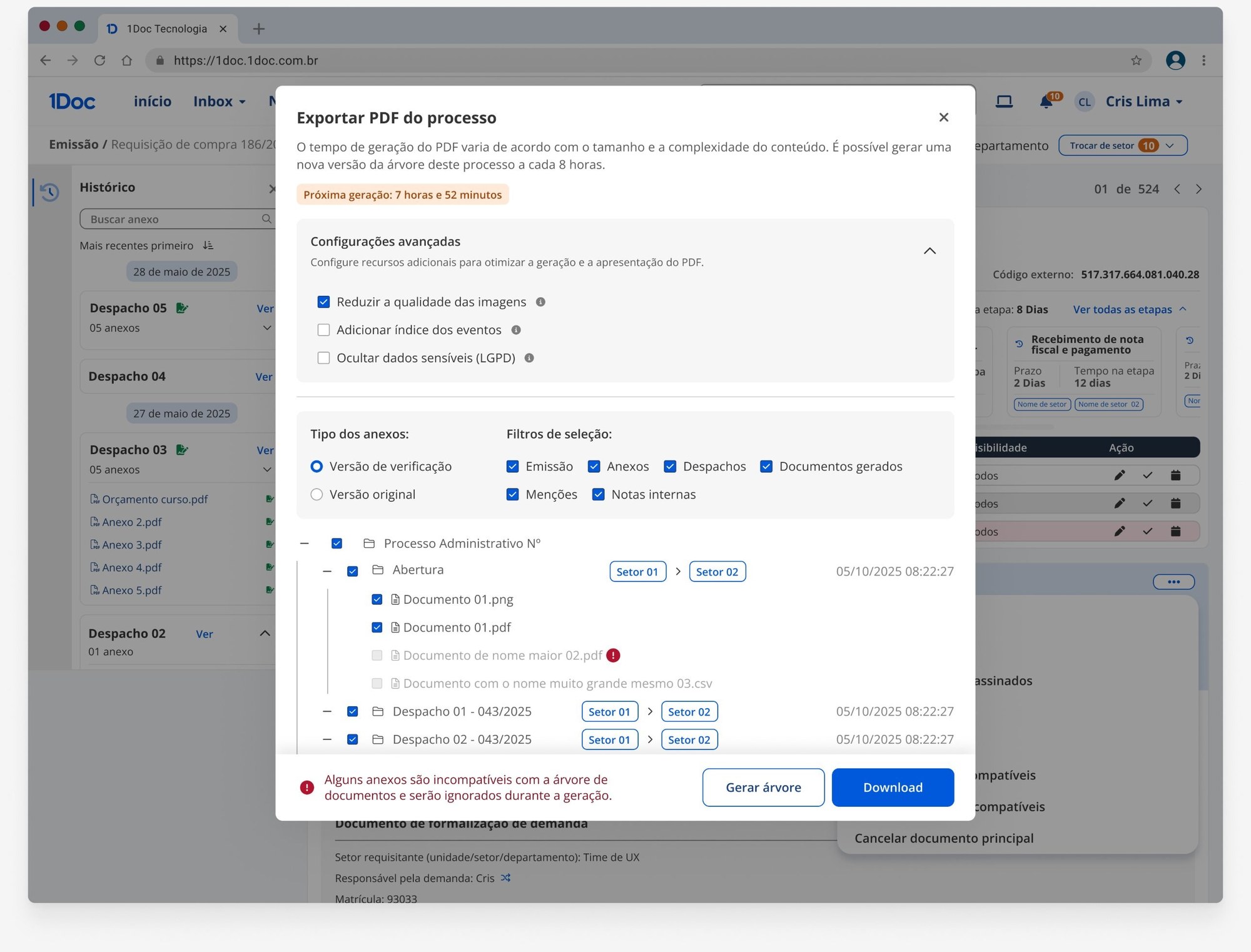
Tree modal

  • A single option instead of a select, with checkboxes and filters pre-applied, letting users choose between the original file or one with authenticity verification.
  • Support for PNG and JPEG files.
  • Better usability and layout for the custom tree.
  • Custom tree with a verification file.

Advanced settings

  • Image and attachment compression by default, for lighter files (POC).
  • Data anonymization, defining what should be masked based on the LGPD (POC).
  • Clickable table of contents with hyperlinks (POC).

Document attachments

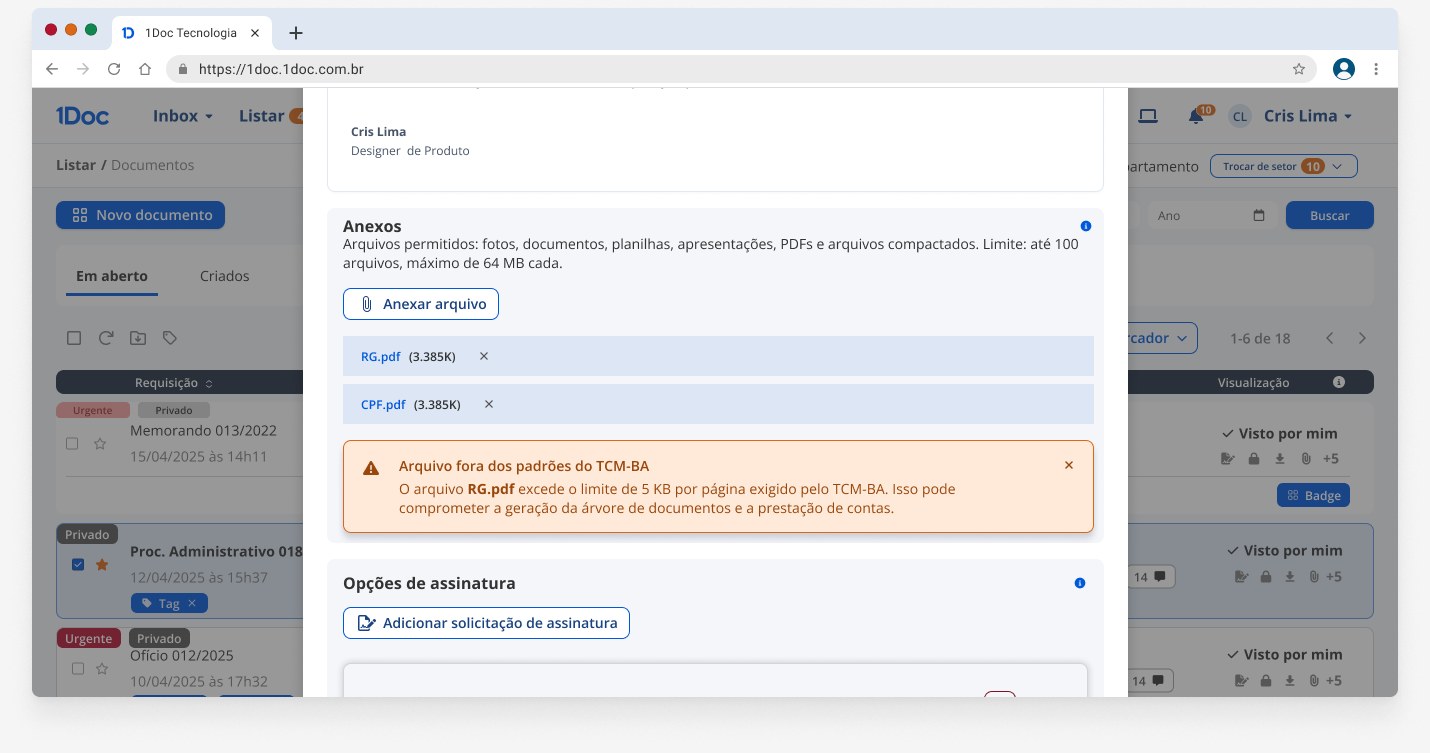
  • A tooltip for files that exceed an oversight body’s standard, such as TCM-BA’s, configurable via a parameter.
  • Attachment best practices in the Administrative Process and Filing modules.

Generated trees screen

  • Access for the whole department, except level 3 users.
  • Storage for a set period, with 30 days as the baseline.
  • Filters by date range, workflow type, name or number, and status.
  • Cancel, download, and delete actions, with a confirmation modal.

Naming

  • “Unified tree” is renamed “Export PDF,” a clearer name for the people who use it.
New Export process PDF modal: next-generation notice, advanced settings to reduce image quality, add an index and hide sensitive data, attachment type, selection filters and the document tree with incompatible attachments flagged.
New Export process PDF modal, with advanced settings, pre-applied filters and incompatible attachments flagged.
Exported PDFs management screen: filters by date, process type, status and number, cards showing in-progress or completed status, date, page count and download, delete and cancel actions.
New Exported PDFs management screen, with filters, generation status and files available for 30 days.
Warning when attaching a file that exceeds the per-page limit required by TCM-BA, which may compromise tree generation and accountability reporting.
Attachment warning when a file falls outside an oversight body’s standards, such as TCM-BA’s.

Validation with customers

We validated the prototype over video calls with 3 of the 4 customers we interviewed, and all of them approved the proposal.

“Anonymizing personal data is going to help us a lot (...) honestly, your proposal turned out even better than I imagined, I already want to use the feature.”Customer · prototype validation
05

Technical solution results

With the technical solution in production, bugs, tickets and generation time all went down. Data covers April to August 2026, as of 08/04/2026.
  • −78%open Document Tree bugs: 79 in June → 17 in July
  • 0new bugs in August, as of 08/04/2026
  • −71%customer tickets per week: average of 21.3 → 6.2
  • 1h51average time to generate the largest tree, which used to take up to 4h03

Customer tickets about the Document Tree, per week (Jun 1 to Aug 2, 2026)

First 4 weeks average: 21.3Last 5 weeks average: 6.2
A 71% drop in the weekly average between the first four and the last five weeks of the period, with five weeks in a row below 10 tickets.
06

Next steps

  • Anonymization POC. Investigate how to mask personal data and which data falls under LGPD rules.
  • Older trees. Understand which trees generated long ago are still accessed, to calibrate the storage period.
  • Downloads. Measure how many times each tree is downloaded and whether people come back to download it again.
  • Storage cost. Estimate the savings in tree storage costs.