Case 04 · 1Doc
Signature 2.0
Designing and evolving 1Doc’s new Electronic Signature journey, including integration with Gov.br digital signatures.
Work in progress. I’m still organizing and structuring this case, so some sections and images may be missing.
[Case cover image]
- Company
- 1Doc · Softplan
- My role
- Product Designer
- Timeline
- Q4 2025 - Ongoing
Context
1Doc is a process and document management platform used by public institutions to digitize processes, documents and communications.
It brings together different modules, such as administrative processes, memos and circulars. As a process moves through departments, a document often needs to be signed by several people before the process can move on.
In public administration, this step involves civil servants, secretaries, managers and authorities, each with a different responsibility over the documents.
The previous signature model
Since the platform was first built, signing worked as a single step: when a process was sent for signature, every document was merged into one PDF, and every participant signed that same content.
The model simplified some flows, but it didn’t reflect the complexity of real processes, where different people are responsible for different documents.
This limitation came up often in our relationship with customers. Being able to sign documents individually was among the most frequent requests received by the Customer Success team, and the topic also weighed on the dissatisfaction recorded in CSAT surveys.
To understand these frustrations in depth, we talked to 5 customers.
- 5customers interviewed
- 1single PDF with every document
- ~40signers in some processes
The model treated signing as a single action, while public processes required different combinations of documents, people, signature types and execution rules.
What wasn’t working
Everyone signed everything
Every participant signed the full set of documents, even when they were responsible for only one of them.
One department might need to sign only document 1, another only document 2, and the mayor just document 3. Even so, everyone signed everything.
| Doc 1 | Doc 2 | Doc 3 | |
|---|---|---|---|
| Dept. A | ✓ | ✓ | ✓ |
| Dept. B | ✓ | ✓ | ✓ |
| Mayor | ✓ | ✓ | ✓ |
| Doc 1 | Doc 2 | Doc 3 | |
|---|---|---|---|
| Dept. A | ✓ | ||
| Dept. B | ✓ | ||
| Mayor | ✓ |
The result was unnecessary signatures and people validating documents unrelated to their role in the process.
The signature type depended on the context
Not everyone could use the same type of signature. In some cases, mayors, secretaries and other officials needed an ICP-Brasil digital certificate; in others, 1Doc’s electronic signature was enough.
If someone signed with the wrong method, the process was cancelled and every participant had to sign again.
The challenge wasn’t just choosing a signature type, but making sure each person used the right method for that document and context.
Signatures were blocked
The model also had a lock: no one could sign while another person was signing.
In processes with many participants, this created a cascade, where each person depended on the previous one to be able to sign. With dozens of signers (around 40 in some cases), the process became slow and full of bottlenecks.
Incompatible documents interrupted the process
The files themselves also caused problems. PDFs with complex layers, charts, images, passwords or other structures could be incompatible with the signer.
To work around this, many customers turned to external PDF converters and editors, which sometimes created new incompatibilities.
When that happened, the process had to be stopped, the document fixed and a new request issued.
Solution
The proposal was to turn signing into a configurable step, able to keep up with the complexity of public processes.
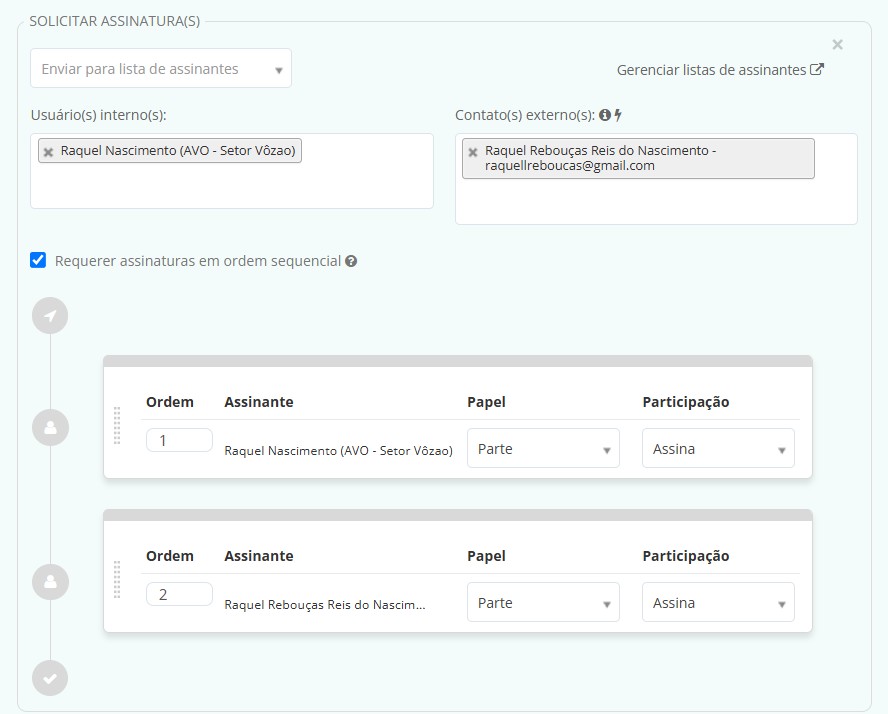
Signature blocks
When issuing a process, the user now builds signature blocks. In each block, they define who signs, which documents those people must sign and which signature type is required.
In the example below, users 1, 2 and 3 sign all three documents, while user 4 signs only document 2.
This makes it possible to combine different departments, people and signature types in the same process.
Sign or decline document by document
A setting defines whether every participant must sign or decline all attachments at once. When it is turned off, each person can sign or decline documents individually.
No more lock between signatures
In the signer, we removed the lock that prevented someone from signing while another person was signing. 1Doc signatures are now processed in an asynchronous queue.
The lock remains only for ICP-Brasil signatures, because of the hash generated by the certificate. To avoid conflicts, we created a socket that updates the status in real time: if someone is signing, the interface warns the user and blocks the action at that moment.
More ways to sign for external users
External users got new signing options:
- Gov.br: first implemented in the legacy signer, before Signature 2.0 was completed, and also coming to the new journey.
- Email token: the signature is confirmed with a token sent to the user’s email.
A dedicated signature queue
Signature requests used to be mixed in with notifications. Now the signature queue has a space of its own.
Users can also sign several different requests in batch, and the signer splits signature types into tabs so they can be completed in steps.
The new journey gives more freedom and autonomy when configuring processes and keeps up with the complexity public processes require.
Results
The new signature journey is still in development. Results will be added here after launch.