Dedicated team
Larger city halls, like Araraquara, have a department solely for managing the platform, with tighter control and their own processes.
Case 05 · 1Doc
A qualitative study with city hall administrators and the Customer Success team to understand who manages 1Doc, how they work, and where the platform still gets in the way of their day-to-day.
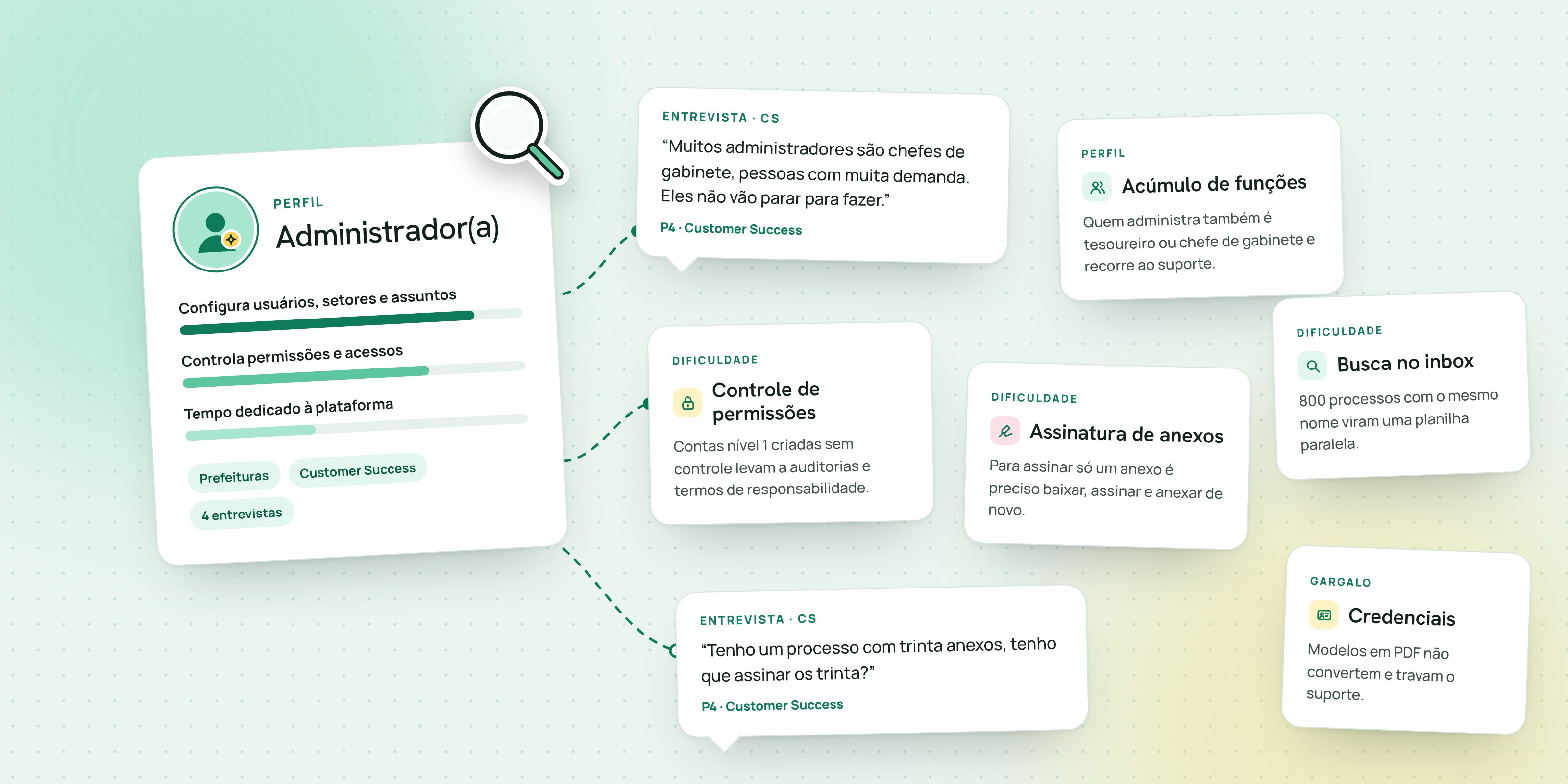
Identify the different profiles of 1Doc admin users, understand how they behave day to day, and map the main challenges, opportunities, and improvement ideas around using the platform.
We interviewed city hall administrators and a Customer Success analyst at 1Doc, so we could cross-reference the firsthand experience of people using the platform with the requests that most often reach the account team.
Career civil servant and director of the general services unit at the Department of Administration. Also works on records management and citizen services.
Head of an IT subdivision, responsible for administering 1Doc and for routing digital processes.
Former head of the purchasing department and current treasurer, working in financial management.
Law graduate with an MBA in Process Management and Engineering. Part of the Customer Success team.
The interviews were held over video call, following a semi-structured script. The questions guided the conversation while leaving room for participants to bring up real situations from their daily work.
The recordings were organized in Marvin, a research repository tool that transcribes videos and supports analysis. With it, I was able to:
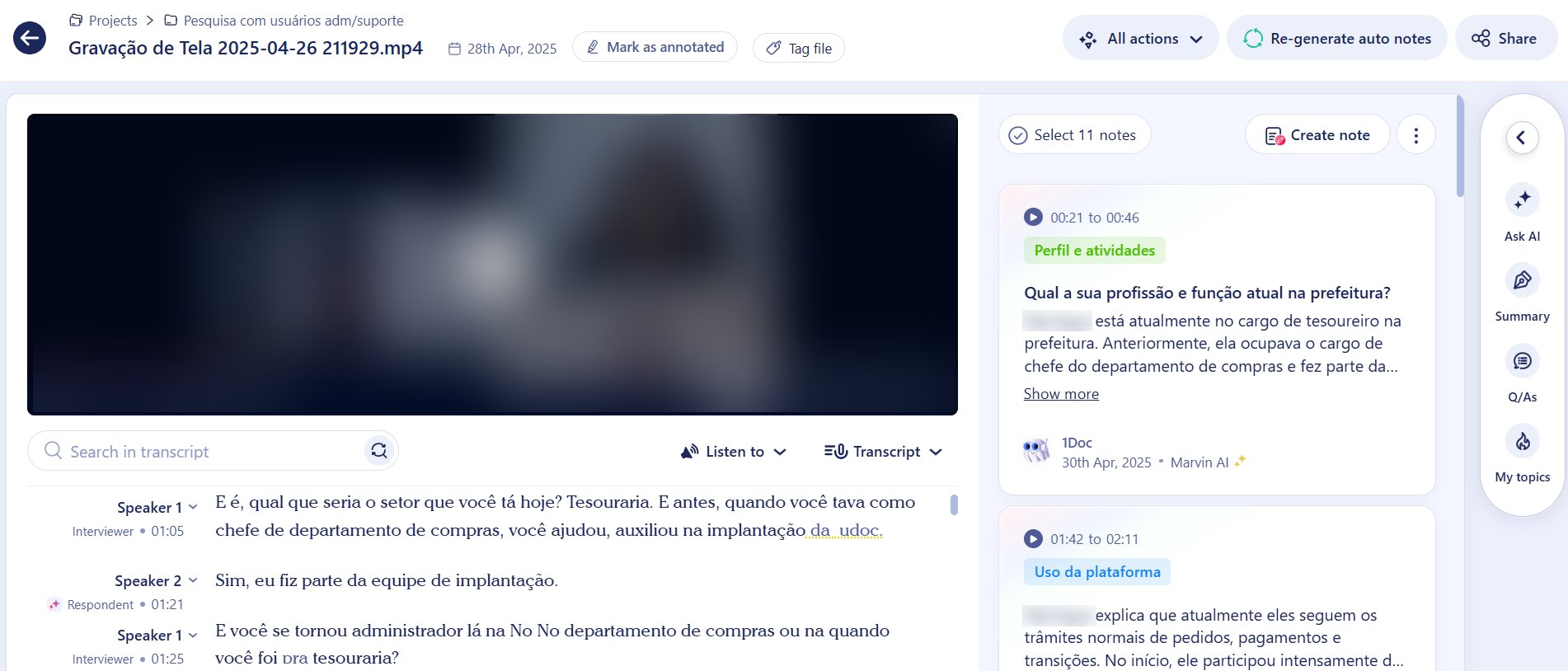
The quotes were grouped under five tags, which shaped the synthesis and the following sections of this case:
Administrators set up users, departments, and subjects, along with specific modules such as protocols, document issuance, and org charts. But the profile varies a lot from one city hall to another. Based on our conversations with admins, we identified the following profiles:
Larger city halls, like Araraquara, have a department solely for managing the platform, with tighter control and their own processes.
The administrator is also a chief of staff, undersecretary, or treasurer. Short on time, they lean more on support.
In Americana, level 1 users manage their own departments, and the administrator helps with adding users and giving guidance.
“A lot of administrators are chiefs of staff, undersecretaries, people with a ton on their plate. They’re not going to stop and do it. They go to support, support says it’s the administrator’s job, and then a lot of them come to us and ask.”P4 · Customer Success
“We made the work more decentralized, so each manager handles their own area, and we take care of the big-picture stuff. We do about sixty, seventy percent here; the rest is done by everyone else.”P1 · Americana
Where user management is centralized, there’s more concern about permissions, especially level 1 ones. The platform charges per active user, and accounts can be created for people who shouldn’t have access to certain modules. This leads to periodic audits and in-house control processes.
“We could use something in between level one and level two. We send out a responsibility agreement, because of the LGPD, for staff to sign. With level one able to create users, it’s already happened that people created them without us having any control.”P2 · Araraquara
Today, the only option is to sign all of a process’s attachments at once. To sign just one, users have to find the file, download it, sign it, and attach it again.
“Big city halls ask me: I’ve got a process with thirty attachments, do I have to sign all thirty?”P4 · Customer Success
External users can’t search by process number or by applicant name. The inbox only shows the user’s own name, which makes things hard for anyone tracking many requests.
“An engineer of record has eight hundred processes in his inbox, all under his name. Most of them keep a separate Excel spreadsheet just to know that filing 50 belongs to one applicant and 51 to another.”P1 · Americana
Clients frequently ask for ID cards and credentials that don’t yet have a template on the platform. Many send the template as a PDF, which doesn’t convert well to DOCX, and setup becomes a bottleneck for support.
“If we take that PDF and convert it to Word, it gets distorted and we can’t set it up. If we had our own standard template, I’m sure they’d go with it.”P4 · Customer Success
The Stages feature doesn’t allow a stage to be edited without removing every process linked to it. In the public sector, changes of secretaries and reorganizations shift workflows often, and the city hall ended up abandoning the feature.
“Nothing stays put. A new secretary comes in and wants to change a bunch of things. If you have to edit the stage, you have to pull out everything inside it.”P1 · Americana
Many clients don’t understand the difference between “archive” and “archive and stop following,” which skews the efficiency metrics on the dashboards.
“In every training session I sit in on, this causes confusion.”P4 · Customer Success
Reports still don’t match the real numbers, and metrics like user inactivity raise questions about which parameter is being used. In city halls with small teams, the tool ends up rarely used.
“If I pull a report in advanced search, I get five hundred records; in analytics it’s three, four hundred. It started at ten, got to ninety, but it’s not at a hundred.”P1 · Americana
The new version makes it easier to extract fields, which usually end up in spreadsheets and charts. Since it was recent, there wasn’t a settled opinion on it yet.
The process number is missing from the main screen, the labels don’t make it clear which action was taken, and searches with more than two thousand rows can’t be exported.
“I don’t know all the technical terms in there. I have to open a ticket to ask.”P2 · Araraquara
1Doc plays an essential role in digitizing public agencies and managing their records, but those who administer it still face significant challenges. Profiles range from entire teams dedicated to the tool to professionals juggling several roles.
Those who centralize management want more control over permissions. Those who decentralize need usability that gives department users autonomy.
The research was conducted in April 2025. Since then, it has served as a foundation for the roadmap: some of the opportunities have already shipped, and the rest remain mapped in the backlog.
Improvements to search and filters to find requests faster.
Handling of rejected documents within the process’s document tree.
Still documented and awaiting prioritization with the product team. Some requests, such as editing an issued document, are more complex, because the public sector requires transparency and integrity of documents.